

Now offering Palworld Game Servers!
Help
Register
Billing
Support
Sandbox Hosting
  • 0 Votre panier
  • Espace client
  • Magasin
    • Tout parcourir
    • Enregistrer un nom de domaine
    • Transférer un nom de domaine
  • Actualités
  • Base de connaissances
  • État du réseau
  • Affiliés
  • Contactez-nous
  • Plus
  • Espace client
    • Connexion
    • Inscription
    • Mot de passe oublié?
  1. Accueil
  2. Base de connaissances
  3. Sandbox Hosting
  4. Games
  5. Arma Reforger
  6. Arma Reforger Quickstart Guide

  Catégories

1
Sandbox Hosting

  Catégories

  Nuage de tags

Sandbox Hosting quickstart ark survival evolved ark ark se arma arma 3 Arma Reforger CS2 Counter-Strike 2 Rust Valheim Tf2 team fortress 2 update ARK Survival Ascended ascended map dlc Password admin Admin password Cheat ARK Palworld Palworld Server Connection Palworld Guide Palword Palworld password curseforge Curseforge Mods Mods Mods Installations Server Configurations ARK: Survival Ascended Hytale Quickstart Guide Server name Server password Abberation Expansion Map Abberation DLC Maps Map Change Astraeos Map Astraeos Expansion Map Switching to ARK: Survival Ascended Amissa Map Amissa DLC Extinction DLC Extinction DLC Map Extinction Map Forglar Map Forglar Ragnarok DLC Ragnarok Map Ragnarok

  Support

  Support   Actualités   Base de connaissances   Téléchargements   État du réseau   Ouvrir une demande

Arma Reforger Quickstart Guide Imprimer

  • arma, Arma Reforger, quickstart
  • 0

This guide will show you how to join and edit your ARMA Reforger server.

Click here to order your own Arma Reforger server with SBoxHost


Open and log in to your SBoxHosting Control Panel.

Copy the Connection Info or Query Info IP/Port listed.
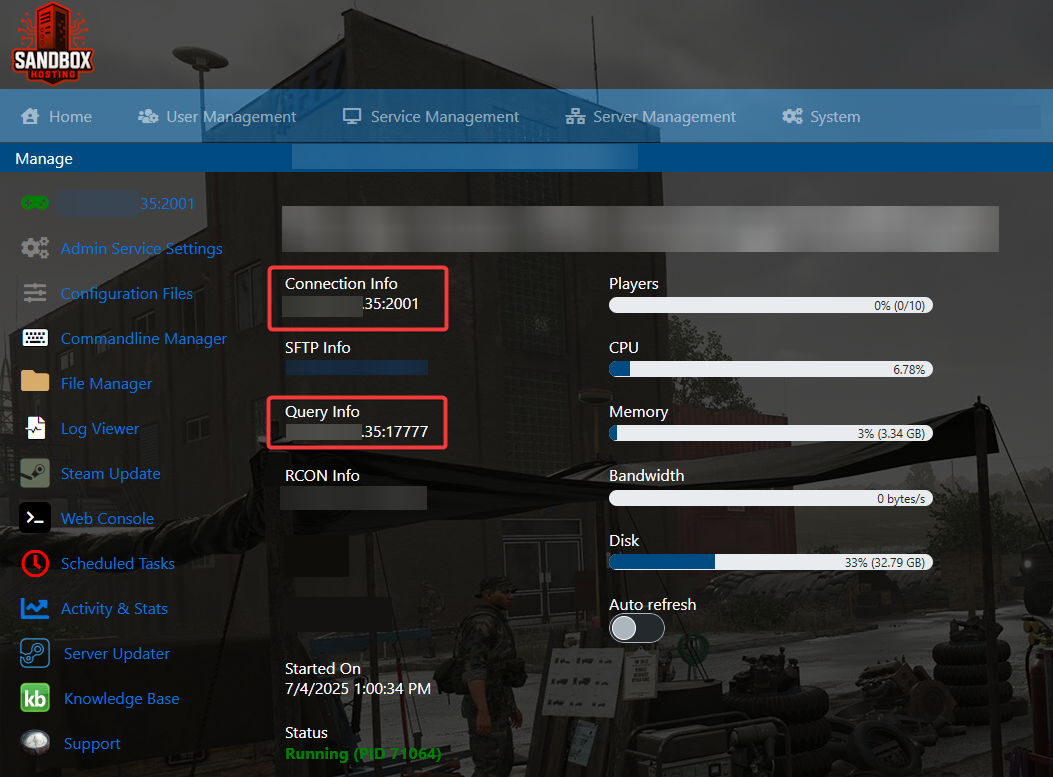


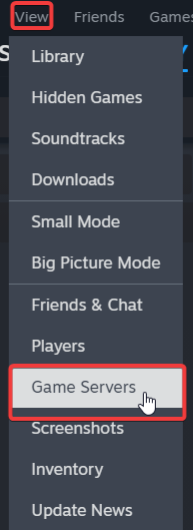
Open Steam. Click the View tab, then click Game Servers.


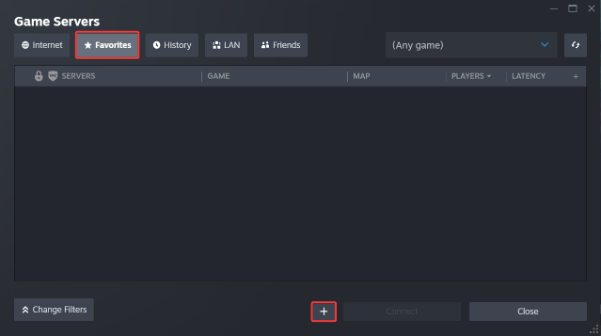
Click on the Favourites tab, then click the "+" icon and then Add Server.


Paste in your server's Connection Info or Query Info IP/Port.
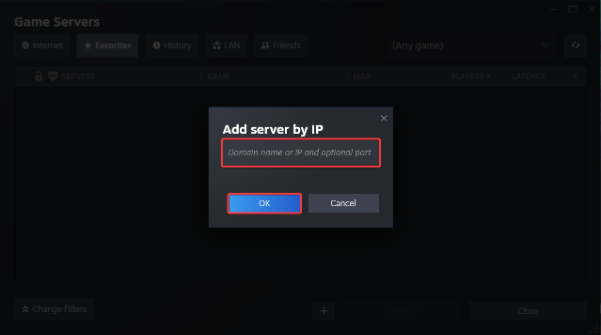


Click Connect.
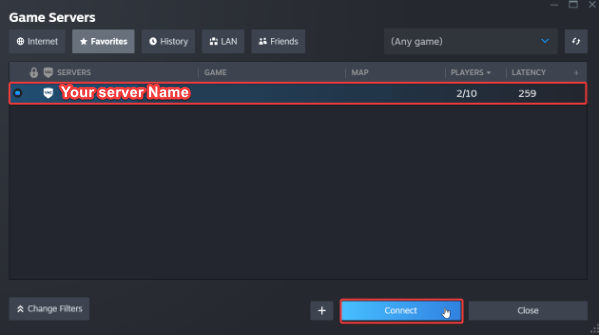


You can also use the Connection Info to Directly connect
via the games In-Game server browser or Launcher.

To edit server settings, follow these steps:

Log in to your SBoxHosting Control Panel.

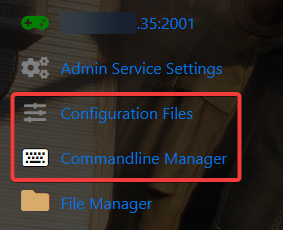
Open the Configuration Files and Commandline Manager.


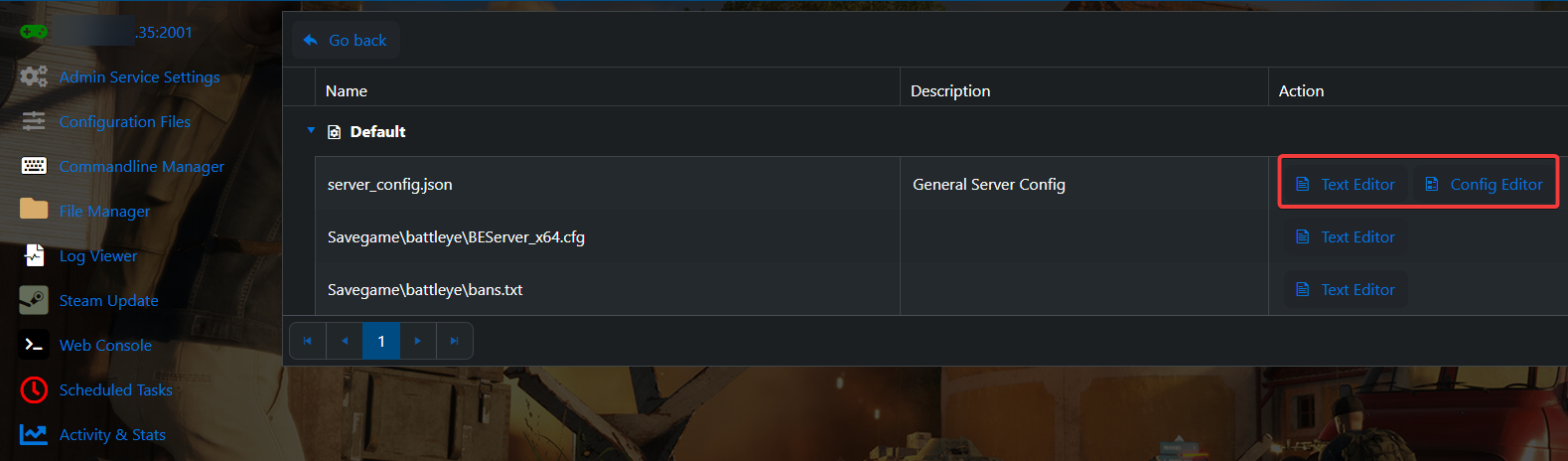
For the Configuration Files, select the “Config Editor” Button.
A pop-up will appear with settings you can change easily like Server Name and Password.
You can also use “Text Editor” to change the configuration contents directly.


For the Commandline Manager, select what commandline you want activated.
There is usually a default line and a modded line for our Control Panels.

Press modify on the one you want and edit the available settings like Server Name and Password.
There are also options to edit the mods and configs to load on the Command Line.
Once you have finished editing, hit apply at the bottom when done.


Did the above information not work for you?
Please click here to contact our support via a ticket.


Cette réponse était-elle pertinente?

« Retour

  Nuage de tags

Sandbox Hosting quickstart ark survival evolved ark ark se arma arma 3 Arma Reforger CS2 Counter-Strike 2 Rust Valheim Tf2 team fortress 2 update ARK Survival Ascended ascended map dlc Password admin Admin password Cheat ARK Palworld Palworld Server Connection Palworld Guide Palword Palworld password curseforge Curseforge Mods Mods Mods Installations Server Configurations ARK: Survival Ascended Hytale Quickstart Guide Server name Server password Abberation Expansion Map Abberation DLC Maps Map Change Astraeos Map Astraeos Expansion Map Switching to ARK: Survival Ascended Amissa Map Amissa DLC Extinction DLC Extinction DLC Map Extinction Map Forglar Map Forglar Ragnarok DLC Ragnarok Map Ragnarok

  Support

  Support   Actualités   Base de connaissances   Téléchargements   État du réseau   Ouvrir une demande

Chargement en cours...
Choisir la langue
العربية
Azerbaijani
Català
中文
Hrvatski
Čeština
Dansk
Nederlands
English
Estonian
Persian
Français
Deutsch
עברית
Magyar
Italiano
Macedonian
Norwegian
Português
Português
Română
Русский
Español
Svenska
Türkçe
Українська

Sélectionnez la devise

£ GBP
$ USD
€ EUR

Générer un mot de passe

Veuillez entrer un nombre entre 8 et 64 pour la longueur du mot de passe

SboxHost Delivering top-tier high performance Game Servers at budget-friendly prices. We continuously refine our services to ensure maximum value while maintaining uncompromising quality.

Product
  • Web Hosting
  • Game Servers
  • Budget Servers
  • Dedicated Servers
Popular Game Hosting
  • Ark Survival Evolved
  • DayZ Standalone
  • ArmA Reforger
  • Rust
Company
  • About Us
  • Careers
  • Privacy Policy
  • Terms & Conditions
  • Copyright 2025 - SBoxHost All Rights Reserved.