

Now offering Palworld Game Servers!
Help
Register
Billing
Support
Sandbox Hosting
  • 0 Shopping Cart
  • Home
  • Store
    • Browse All
    • Register a New Domain
    • Transfer Domains to Us
  • Announcements
  • Knowledgebase
  • Network Status
  • Affiliates
  • Contact Us
  • More
  • Account
    • Login
    • Register
    • Forgot Password?
  1. Portal Home
  2. Knowledgebase
  3. Sandbox Hosting
  4. Games
  5. ARK: Survival Ascended
  6. How to Change your Map to Ragnarok on your ARK Survival Ascended Server

  Categories

1
Sandbox Hosting

  Categories

  Tag Cloud

Sandbox Hosting quickstart ark survival evolved ark ark se arma arma 3 Arma Reforger CS2 Counter-Strike 2 Rust Valheim Tf2 team fortress 2 update ARK Survival Ascended ascended map dlc Password admin Admin password Cheat ARK Palworld Palworld Server Connection Palworld Guide Palword Palworld password curseforge Curseforge Mods Mods Mods Installations Server Configurations ARK: Survival Ascended Hytale Quickstart Guide Server name Server password Abberation Expansion Map Abberation DLC Maps Map Change Astraeos Map Astraeos Expansion Map Switching to ARK: Survival Ascended Amissa Map Amissa DLC Extinction DLC Extinction DLC Map Extinction Map Forglar Map Forglar Ragnarok DLC Ragnarok Map Ragnarok

  Support

  My Support Tickets   Announcements   Knowledgebase   Downloads   Network Status   Open Ticket

How to Change your Map to Ragnarok on your ARK Survival Ascended Server Print

  • Ragnarok DLC, Ragnarok Map, Ragnarok, Maps, Map Change, Server Configurations, ARK: Survival Ascended
  • 0

This guide will help you learn how to change your Map to Ragnarok on your ARK Survival Ascended Server.


Ragnarok is one of the most beloved maps in the ARK universe, offering a vast landscape filled with diverse biomes, unique creatures, and endless opportunities for adventure. Whether you’re looking to explore towering castles, battle wyverns in their nests, or build your base along stunning coastlines, Ragnarok delivers a rich survival experience that keeps players coming back for more. If you’re running your own ARK Survival Ascended server, switching your current map to Ragnarok is a straightforward process but it does require a few specific steps to ensure everything runs smoothly. This guide will walk you through the essentials of changing your server’s map, from adjusting configuration files to restarting your server, so you and your community can dive into the epic world of Ragnarok without hassle. By the end, you’ll be ready to host adventures on one of ARK’s most expansive and exciting maps.


Changing your Map to Ragnarok on your ARK Survival Ascended Server


Log in to your Game Control Panel and navigate to your service.

Before making any modifications, stop the server from running by clicking the Stop button.

 

There are three methods for changing your map to Ragnarok.


Method 1. Installing via Mod Manager


Navigate to the Mod Manager Tab, look for the Ragnarok Map, and click the Install button on the side.

ark-survival-ascended-server-configuration-switching-to-ragnarok-map-1.png 

Switching map via Commandline Manager
Once in the Control Panel. Click the Commandline Manager and click Modify on the Modded option. 
 

There are two ways to change the map via the command-line manager. 
 
 
Method 2: Using the Default Commandline


Navigate to the Commandline Manager Tab. Click Modify on the Default Commandline option. This will display the available options, including the Map section.
Select the "Ragnarok DLC MAP"  for the Aberration map.

 

Method 3: Using a Modded Commandline
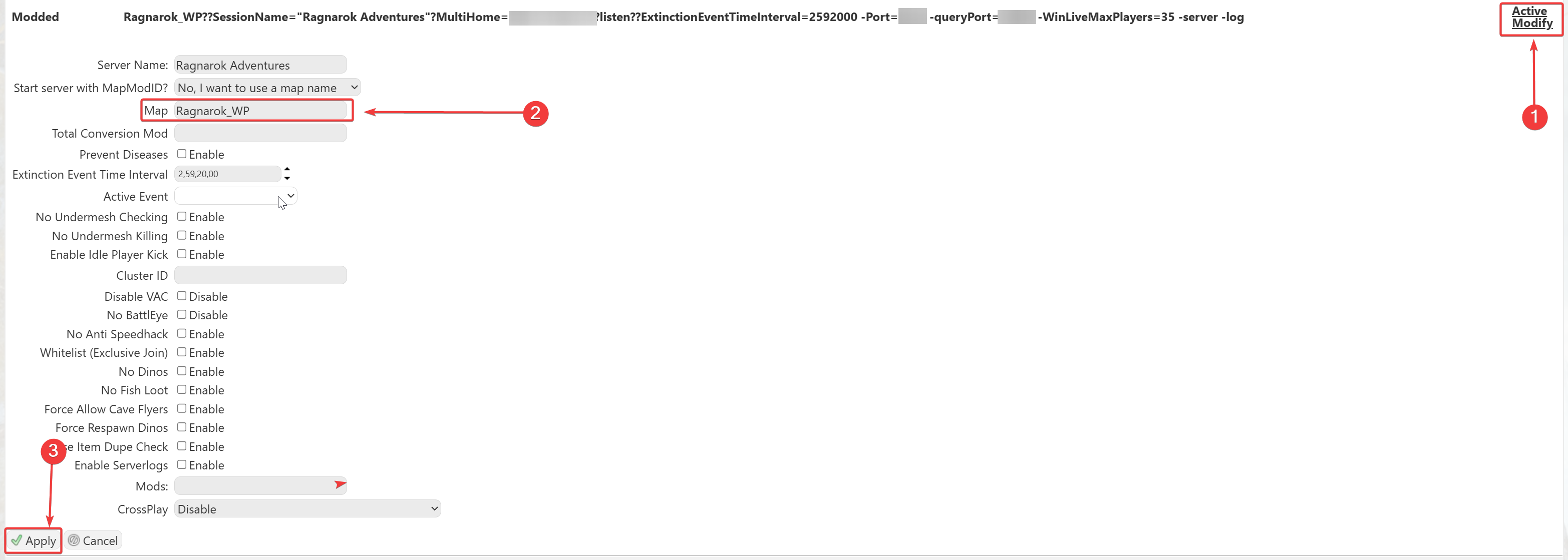
 

Click Modify on the Modded option. This will show the options available, but importantly, the Map section. Enter 'Ragnarok_WP' to use the Aberration map on your server.
 
 
Note: We support all official maps of the game for ARK: Ascended. "_WP" needs to be added at the end for the maps to work.
Please make sure to follow proper capitalization as they are case-sensitive.



Click here to contact our support team for further help.

Was this answer helpful?

Related Articles

How to Update your Ark Ascended Server Keeping your ARK: Survival Ascended server up-to-date ensures stability, new features, and... How to Change the Map on Your ARK: Survival Ascended Server Need to switch maps on your ARK: Survival Ascended server? Here's a quick and easy guide to... How to Update the Server Name and Password on Your ARK: Survival Ascended Server Want to customize your server name or add a password for private access? This guide shows you... How to Enable and Use Cheats in ARK: Survival Ascended Cheats let you perform powerful admin actions like spawning items, teleporting, and toggling... ARK: Survival Ascended Quickstart Guide Want to jump into your ARK server quickly? Here’s a simple step-by-step to connect using your...
« Back

  Tag Cloud

Sandbox Hosting quickstart ark survival evolved ark ark se arma arma 3 Arma Reforger CS2 Counter-Strike 2 Rust Valheim Tf2 team fortress 2 update ARK Survival Ascended ascended map dlc Password admin Admin password Cheat ARK Palworld Palworld Server Connection Palworld Guide Palword Palworld password curseforge Curseforge Mods Mods Mods Installations Server Configurations ARK: Survival Ascended Hytale Quickstart Guide Server name Server password Abberation Expansion Map Abberation DLC Maps Map Change Astraeos Map Astraeos Expansion Map Switching to ARK: Survival Ascended Amissa Map Amissa DLC Extinction DLC Extinction DLC Map Extinction Map Forglar Map Forglar Ragnarok DLC Ragnarok Map Ragnarok

  Support

  My Support Tickets   Announcements   Knowledgebase   Downloads   Network Status   Open Ticket

Loading...
Loading...
Choose language
العربية
Azerbaijani
Català
中文
Hrvatski
Čeština
Dansk
Nederlands
English
Estonian
Persian
Français
Deutsch
עברית
Magyar
Italiano
Macedonian
Norwegian
Português
Português
Română
Русский
Español
Svenska
Türkçe
Українська

Choose Currency

£ GBP
$ USD
€ EUR

Generate Password

Please enter a number between 8 and 64 for the password length

SboxHost Delivering top-tier high performance Game Servers at budget-friendly prices. We continuously refine our services to ensure maximum value while maintaining uncompromising quality.

Product
  • Web Hosting
  • Game Servers
  • Budget Servers
  • Dedicated Servers
Popular Game Hosting
  • Ark Survival Evolved
  • DayZ Standalone
  • ArmA Reforger
  • Rust
Company
  • About Us
  • Careers
  • Privacy Policy
  • Terms & Conditions
  • Copyright 2025 - SBoxHost All Rights Reserved.