

Now offering Palworld Game Servers!
Help
Register
Billing
Support
Sandbox Hosting
  • 0 Shopping Cart
  • Home
  • Store
    • Browse All
    • Register a New Domain
    • Transfer Domains to Us
  • Announcements
  • Knowledgebase
  • Network Status
  • Affiliates
  • Contact Us
  • More
  • Account
    • Login
    • Register
    • Forgot Password?
  1. Portal Home
  2. Knowledgebase
  3. Sandbox Hosting
  4. Games
  5. Hytale
  6. Hytale Authentication Integration Guide

  Categories

1
Sandbox Hosting

  Categories

  Tag Cloud

Sandbox Hosting quickstart ark survival evolved ark ark se arma arma 3 Arma Reforger CS2 Counter-Strike 2 Rust Valheim Tf2 team fortress 2 update ARK Survival Ascended ascended map dlc Password admin Admin password Cheat ARK Palworld Palworld Server Connection Palworld Guide Palword Palworld password curseforge Curseforge Mods Mods Mods Installations Server Configurations ARK: Survival Ascended Hytale Quickstart Guide Server name Server password Abberation Expansion Map Abberation DLC Maps Map Change Astraeos Map Astraeos Expansion Map Switching to ARK: Survival Ascended Amissa Map Amissa DLC Extinction DLC Extinction DLC Map Extinction Map Forglar Map Forglar Ragnarok DLC Ragnarok Map Ragnarok Server Configuration Hytale Authentication Authentication Authentication Token Server Update Server Permissions Kick Players Kick Ban Players Ban Unban Players Unban Permission List Uploading Save File Save File Save Transfer Data Player Data Enable Whitelist Managing Whitelist Hytale Memories Memories Add Mods Mods Installation Adding Mods

  Support

  My Support Tickets   Announcements   Knowledgebase   Downloads   Network Status   Open Ticket

Hytale Authentication Integration Guide Print

  • Hytale, Server Configuration, Hytale Authentication, Authentication, Authentication Token
  • 0

hytale-logo.png

This guide will help you with Hytale Authentication Integration Guide.


Authentication is a core pillar of any secure and scalable Hytale‑based application. Whether you’re building a community website, a custom launcher, a server‑side integration, or a full‑fledged platform that interacts with Hytale services, understanding how to properly authenticate users is essential. A reliable authentication flow not only protects player accounts and sensitive data but also enables smoother gameplay experiences, personalized features, and trusted interactions across your ecosystem. This guide provides a clear, practical walkthrough of integrating Hytale’s authentication system into your project. It covers how the authentication model works, how tokens are issued and validated, and how to securely manage user sessions. Along the way, it highlights common pitfalls, recommended security practices, and implementation patterns that align with modern standards. By the end, you’ll have a solid foundation for building secure, user‑friendly authentication into any Hytale‑connected application, whether you’re a hobbyist developer or architecting a large‑scale service.


Authenticating your Hytale Server


Device Authorization (Recommended Method)

The device authorization method works on headless servers and does not require a browser on the server itself.


1. Log in to your Game Control Panel.


2. Navigate to the Web Console.
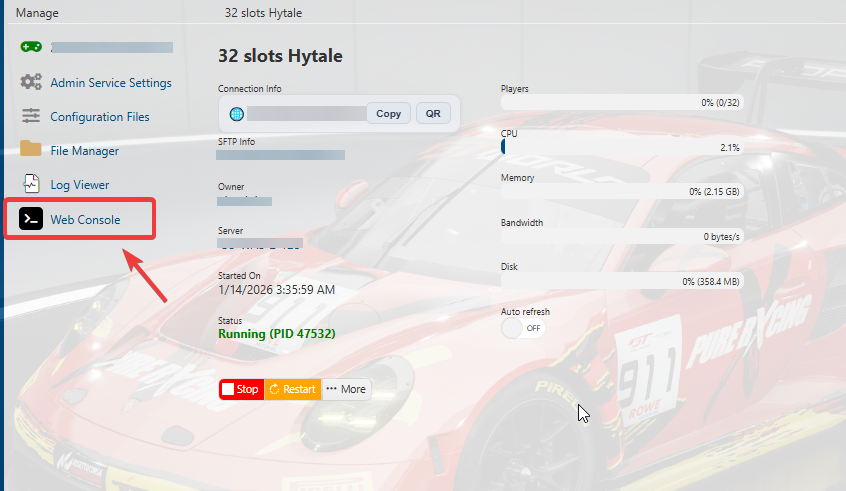


3: Initiate Login

In your server console, run:

/auth login device
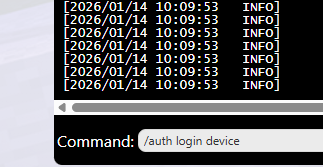
 

4. Open the Authorization Page

The console will display a message similar to the following:

============================================================
DEVICE AUTHORIZATION
============================================================
Visit: https://accounts.hytale.com/device
Enter code: ABCD-1234
Or use: https://accounts.hytale.com/device?user_code=ABCD-1234
============================================================
Waiting for authorization (expires in 900 seconds)...

 

5: Approve the Server

Open the provided link on any device with a web browser

Sign in to your Hytale account

Enter the authorization code (if prompted)

Confirm access for the server
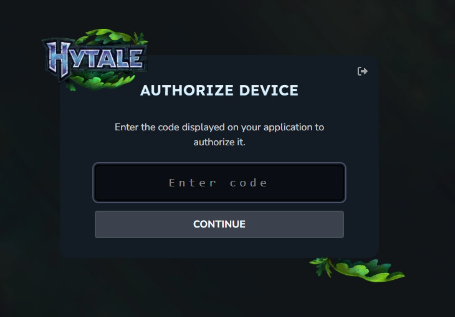

6: Authentication Complete

Once approved, your server console will confirm success, indicating the server is now authenticated and ready to accept players.

Authentication successful! Mode: OAUTH_DEVICE
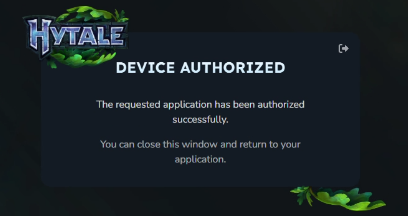


7
. Run the command below in the web console:

/auth persistence Encrypted

This will forever save the token/auth to the server.


All Set! You can then follow our Quick Start Guide.

Checking Authentication Status

To confirm your server is authenticated, run:

/auth status

This will display whether the server is currently logged in and authorized.
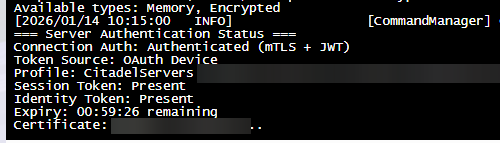


Authentication Commands Reference

Command Purpose
/auth login device Starts device-based authentication (recommended)
/auth login browser Starts browser-based login (requires desktop access)
/auth select <number> Choose a profile if multiple accounts are detected
/auth status Displays current authentication state
/auth cancel Stops an active login attempt
/auth logout Clears authentication data and logs out


Authentication Token Behavior

Hytale uses OAuth tokens to maintain secure access. These tokens refresh automatically while the server remains online.

Token Type Valid Duration Description
Access Token ~1 hour Used for session creation
Refresh Token ~30 days Renews access tokens
Game Session ~1 hour Automatically renewed before expiry

As long as your server stays online, re-authentication is usually unnecessary.


Common Issues & Fixes

Authentication Failed at Startup

If the server starts without authentication, try the following:

1. Re-run /auth login device

2. Ensure the token has not expired

3. Verify the account has the correct permissions


When Re-Authentication Is Required

You may need to log in again if:

- The server was offline for over 30 days

- You manually logged out

- Account credentials were changed



Was this answer helpful?

Related Articles

Hytale Quickstart Guide This quickstart guide will help you start your adventure on your Hytale Server.   Hytale is a... How to Configure your Server Settings on your Hytale Server   This quickstart guide will help you start your adventure on your Hytale Server.   Running... How to Safely Update Your Hytale Server This guide will help you learn how to Safely Update Your Hytale Server.   A safe and reliable... Step‑by‑Step Guide to Configuring Permissions on Your Hytale Server This quickstart guide will help you with a step-by-step guide to Configuring Permissions on... Hytale Server Admin Guide: How to Kick, Ban, and Unban Players This quickstart guide will help you start your adventure on your Hytale Server.   Running a...
« Back

  Tag Cloud

Sandbox Hosting quickstart ark survival evolved ark ark se arma arma 3 Arma Reforger CS2 Counter-Strike 2 Rust Valheim Tf2 team fortress 2 update ARK Survival Ascended ascended map dlc Password admin Admin password Cheat ARK Palworld Palworld Server Connection Palworld Guide Palword Palworld password curseforge Curseforge Mods Mods Mods Installations Server Configurations ARK: Survival Ascended Hytale Quickstart Guide Server name Server password Abberation Expansion Map Abberation DLC Maps Map Change Astraeos Map Astraeos Expansion Map Switching to ARK: Survival Ascended Amissa Map Amissa DLC Extinction DLC Extinction DLC Map Extinction Map Forglar Map Forglar Ragnarok DLC Ragnarok Map Ragnarok Server Configuration Hytale Authentication Authentication Authentication Token Server Update Server Permissions Kick Players Kick Ban Players Ban Unban Players Unban Permission List Uploading Save File Save File Save Transfer Data Player Data Enable Whitelist Managing Whitelist Hytale Memories Memories Add Mods Mods Installation Adding Mods

  Support

  My Support Tickets   Announcements   Knowledgebase   Downloads   Network Status   Open Ticket

Loading...
Loading...
Choose language
العربية
Azerbaijani
Català
中文
Hrvatski
Čeština
Dansk
Nederlands
English
Estonian
Persian
Français
Deutsch
עברית
Magyar
Italiano
Macedonian
Norwegian
Português
Português
Română
Русский
Español
Svenska
Türkçe
Українська

Choose Currency

£ GBP
$ USD
€ EUR

Generate Password

Please enter a number between 8 and 64 for the password length

SboxHost Delivering top-tier high performance Game Servers at budget-friendly prices. We continuously refine our services to ensure maximum value while maintaining uncompromising quality.

Product
  • Web Hosting
  • Game Servers
  • Budget Servers
  • Dedicated Servers
Popular Game Hosting
  • Ark Survival Evolved
  • DayZ Standalone
  • ArmA Reforger
  • Rust
Company
  • About Us
  • Careers
  • Privacy Policy
  • Terms & Conditions
  • Copyright 2025 - SBoxHost All Rights Reserved.