

Now offering Palworld Game Servers!
Help
Register
Billing
Support
Sandbox Hosting
  • 0 Shopping Cart
  • Home
  • Store
    • Browse All
    • Register a New Domain
    • Transfer Domains to Us
  • Announcements
  • Knowledgebase
  • Network Status
  • Affiliates
  • Contact Us
  • More
  • Account
    • Login
    • Register
    • Forgot Password?
  1. Portal Home
  2. Knowledgebase
  3. Sandbox Hosting
  4. Games
  5. Hytale
  6. Enable and Manage Whitelist Access on Your Hytale Server

  Categories

1
Sandbox Hosting

  Categories

  Tag Cloud

Sandbox Hosting quickstart ark survival evolved ark ark se arma arma 3 Arma Reforger CS2 Counter-Strike 2 Rust Valheim Tf2 team fortress 2 update ARK Survival Ascended ascended map dlc Password admin Admin password Cheat ARK Palworld Palworld Server Connection Palworld Guide Palword Palworld password curseforge Curseforge Mods Mods Mods Installations Server Configurations ARK: Survival Ascended Hytale Quickstart Guide Server name Server password Abberation Expansion Map Abberation DLC Maps Map Change Astraeos Map Astraeos Expansion Map Switching to ARK: Survival Ascended Amissa Map Amissa DLC Extinction DLC Extinction DLC Map Extinction Map Forglar Map Forglar Ragnarok DLC Ragnarok Map Ragnarok Server Configuration Hytale Authentication Authentication Authentication Token Server Update Server Permissions Kick Players Kick Ban Players Ban Unban Players Unban Permission List Uploading Save File Save File Save Transfer Data Player Data Enable Whitelist Managing Whitelist Hytale Memories Memories Add Mods Mods Installation Adding Mods

  Support

  My Support Tickets   Announcements   Knowledgebase   Downloads   Network Status   Open Ticket

Enable and Manage Whitelist Access on Your Hytale Server Print

  • Enable Whitelist, Managing Whitelist, Server Configurations, Hytale
  • 0

hytale-logo.png

This quickstart guide will help you with enabling and managing Whitelist Access on your Hytale Server.


Enabling and managing whitelist access on your Hytale server is one of the most effective ways to control who can join your world and keep your community safe. A whitelist lets you approve specific players by name, preventing unwanted visitors, griefers, or random join attempts from accessing your server. Whether you're running a private world for friends or a curated community with trusted members, understanding how the whitelist works gives you full control over your server’s security and player experience. This introduction sets the stage for configuring the whitelist properly, maintaining it over time, and avoiding common issues that can lock players out or leave your server exposed.


Setting Up a Whitelist on your Hytale


1. Log in to your Game Control Panel and navigate to your service.

2. Navigate to the Web-Console Tab.

 

3. In the Web-Console tab, run the following command:


whitelist on


The whitelist can be disabled at any time by entering the following command:


whitelist off
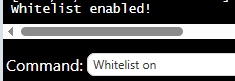
 

hytale-server-configuration-whitelisting-1.png

When the whitelist is enabled, only approved players on the list and server admins will be able to join.


Managing the Whitelist 

Once the whitelist is enabled, you can easily add or remove players at any time to manage server access.


Adding a player from the whitelist:


whitelist add <playername>


Removing a player from the whitelist:


whitelist remove <playername>


Changes take effect instantly, meaning players will gain or lose access the moment the command is executed.

hytale-server-configuration-whitelisting-2.png


Enabling a whitelist is one of the simplest and most effective ways to secure your Hytale server, giving you complete control over who can join and ensuring a safe, trusted community.



Click here to contact our support team for further help.


Was this answer helpful?

Related Articles

Hytale Quickstart Guide This quickstart guide will help you start your adventure on your Hytale Server.   Hytale is a... How to Configure your Server Settings on your Hytale Server   This quickstart guide will help you start your adventure on your Hytale Server.   Running... Hytale Authentication Integration Guide This guide will help you with Hytale Authentication Integration Guide.   Authentication is a... How to Safely Update Your Hytale Server This guide will help you learn how to Safely Update Your Hytale Server.   A safe and reliable... Step‑by‑Step Guide to Configuring Permissions on Your Hytale Server This quickstart guide will help you with a step-by-step guide to Configuring Permissions on...
« Back

  Tag Cloud

Sandbox Hosting quickstart ark survival evolved ark ark se arma arma 3 Arma Reforger CS2 Counter-Strike 2 Rust Valheim Tf2 team fortress 2 update ARK Survival Ascended ascended map dlc Password admin Admin password Cheat ARK Palworld Palworld Server Connection Palworld Guide Palword Palworld password curseforge Curseforge Mods Mods Mods Installations Server Configurations ARK: Survival Ascended Hytale Quickstart Guide Server name Server password Abberation Expansion Map Abberation DLC Maps Map Change Astraeos Map Astraeos Expansion Map Switching to ARK: Survival Ascended Amissa Map Amissa DLC Extinction DLC Extinction DLC Map Extinction Map Forglar Map Forglar Ragnarok DLC Ragnarok Map Ragnarok Server Configuration Hytale Authentication Authentication Authentication Token Server Update Server Permissions Kick Players Kick Ban Players Ban Unban Players Unban Permission List Uploading Save File Save File Save Transfer Data Player Data Enable Whitelist Managing Whitelist Hytale Memories Memories Add Mods Mods Installation Adding Mods

  Support

  My Support Tickets   Announcements   Knowledgebase   Downloads   Network Status   Open Ticket

Loading...
Loading...
Choose language
العربية
Azerbaijani
Català
中文
Hrvatski
Čeština
Dansk
Nederlands
English
Estonian
Persian
Français
Deutsch
עברית
Magyar
Italiano
Macedonian
Norwegian
Português
Português
Română
Русский
Español
Svenska
Türkçe
Українська

Choose Currency

£ GBP
$ USD
€ EUR

Generate Password

Please enter a number between 8 and 64 for the password length

SboxHost Delivering top-tier high performance Game Servers at budget-friendly prices. We continuously refine our services to ensure maximum value while maintaining uncompromising quality.

Product
  • Web Hosting
  • Game Servers
  • Budget Servers
  • Dedicated Servers
Popular Game Hosting
  • Ark Survival Evolved
  • DayZ Standalone
  • ArmA Reforger
  • Rust
Company
  • About Us
  • Careers
  • Privacy Policy
  • Terms & Conditions
  • Copyright 2025 - SBoxHost All Rights Reserved.