

Now offering Palworld Game Servers!
Help
Register
Billing
Support
Sandbox Hosting
  • 0 Shopping Cart
  • Home
  • Store
    • Browse All
    • Register a New Domain
    • Transfer Domains to Us
  • Announcements
  • Knowledgebase
  • Network Status
  • Affiliates
  • Contact Us
  • More
  • Account
    • Login
    • Register
    • Forgot Password?
  1. Portal Home
  2. Knowledgebase
  3. Sandbox Hosting
  4. Games
  5. Hytale
  6. How to Safely Update Your Hytale Server

  Categories

1
Sandbox Hosting

  Categories

  Tag Cloud

Sandbox Hosting quickstart ark survival evolved ark ark se arma arma 3 Arma Reforger CS2 Counter-Strike 2 Rust Valheim Tf2 team fortress 2 update ARK Survival Ascended ascended map dlc Password admin Admin password Cheat ARK Palworld Palworld Server Connection Palworld Guide Palword Palworld password curseforge Curseforge Mods Mods Mods Installations Server Configurations ARK: Survival Ascended Hytale Quickstart Guide Server name Server password Abberation Expansion Map Abberation DLC Maps Map Change Astraeos Map Astraeos Expansion Map Switching to ARK: Survival Ascended Amissa Map Amissa DLC Extinction DLC Extinction DLC Map Extinction Map Forglar Map Forglar Ragnarok DLC Ragnarok Map Ragnarok Server Configuration Hytale Authentication Authentication Authentication Token Server Update Server Permissions Kick Players Kick Ban Players Ban Unban Players Unban Permission List Uploading Save File Save File Save Transfer Data Player Data Enable Whitelist Managing Whitelist Hytale Memories Memories Add Mods Mods Installation Adding Mods

  Support

  My Support Tickets   Announcements   Knowledgebase   Downloads   Network Status   Open Ticket

How to Safely Update Your Hytale Server Print

  • update, Server Update, Hytale, Server Configurations
  • 0

hytale-logo.png

This guide will help you learn how to Safely Update Your Hytale Server.


A safe and reliable update process is one of the most important parts of running a Hytale server. Updates often include critical fixes, performance improvements, new features, and security patches that keep your server stable and protect your players’ data. Applying these updates carefully ensures you avoid downtime, corrupted worlds, or compatibility issues with plugins and configurations. Keeping a server current isn’t just about installing the newest files. It involves preparing backups, checking version compatibility, reviewing changelogs, and validating that your setup, mods, plugins, scripts, and custom configurations will continue to work as expected. A thoughtful update routine helps you maintain uptime, reduce troubleshooting later, and give your community a smooth experience. This guide walks through the safest way to update your Hytale server, from preparation to verification. It highlights common risks, explains how to avoid data loss, and outlines practical steps for ensuring your server stays secure and stable after each update. Before diving in, it’s helpful to know whether your setup uses custom plugins or a vanilla configuration, since that can influence the update process.


Updating your Hytale Server


1. Log in to your Game Control Panel.

2. Click the Download/Update Hytale button.
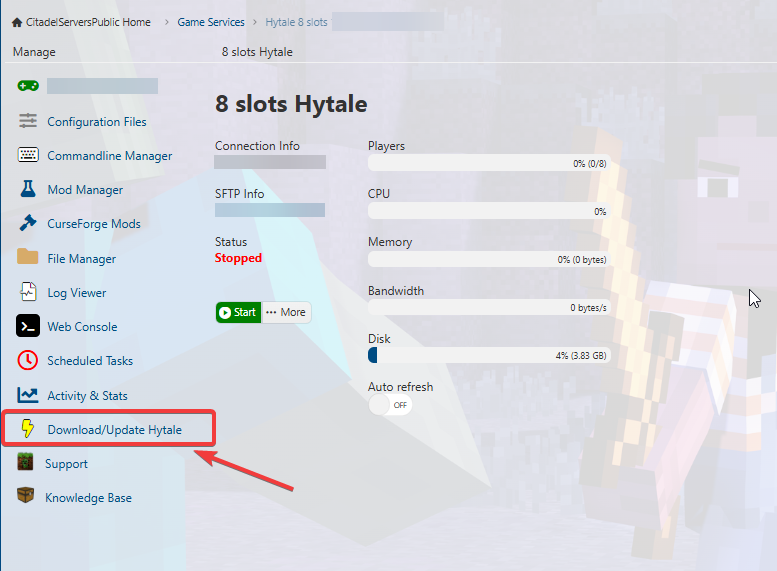


3. Wait for the Download to finish. It may take a couple of minutes. It will look like the image below:
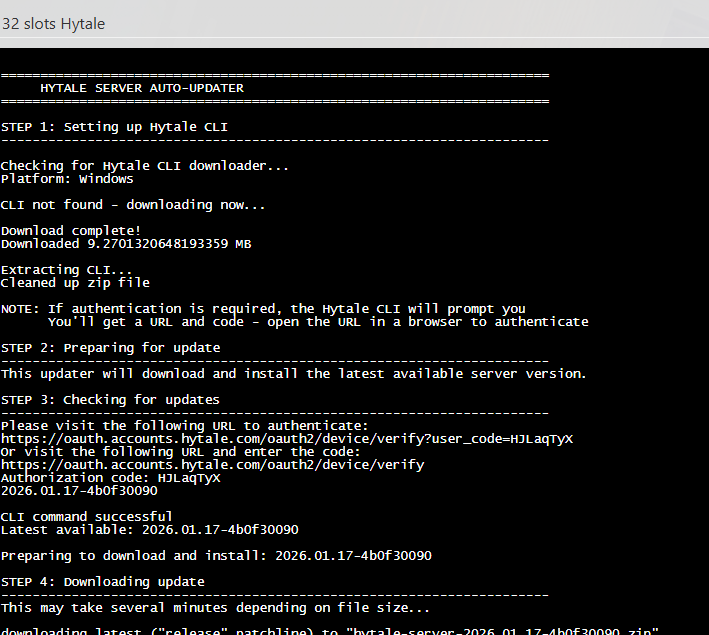


4. Once completed, you will have to authenticate it much like when the server starts for the first time. Follow our guide here: Hytale Authentication Guide


Was this answer helpful?

Related Articles

Hytale Quickstart Guide This quickstart guide will help you start your adventure on your Hytale Server.   Hytale is a... How to Configure your Server Settings on your Hytale Server   This quickstart guide will help you start your adventure on your Hytale Server.   Running... Hytale Authentication Integration Guide This guide will help you with Hytale Authentication Integration Guide.   Authentication is a... Step‑by‑Step Guide to Configuring Permissions on Your Hytale Server This quickstart guide will help you with a step-by-step guide to Configuring Permissions on... Hytale Server Admin Guide: How to Kick, Ban, and Unban Players This quickstart guide will help you start your adventure on your Hytale Server.   Running a...
« Back

  Tag Cloud

Sandbox Hosting quickstart ark survival evolved ark ark se arma arma 3 Arma Reforger CS2 Counter-Strike 2 Rust Valheim Tf2 team fortress 2 update ARK Survival Ascended ascended map dlc Password admin Admin password Cheat ARK Palworld Palworld Server Connection Palworld Guide Palword Palworld password curseforge Curseforge Mods Mods Mods Installations Server Configurations ARK: Survival Ascended Hytale Quickstart Guide Server name Server password Abberation Expansion Map Abberation DLC Maps Map Change Astraeos Map Astraeos Expansion Map Switching to ARK: Survival Ascended Amissa Map Amissa DLC Extinction DLC Extinction DLC Map Extinction Map Forglar Map Forglar Ragnarok DLC Ragnarok Map Ragnarok Server Configuration Hytale Authentication Authentication Authentication Token Server Update Server Permissions Kick Players Kick Ban Players Ban Unban Players Unban Permission List Uploading Save File Save File Save Transfer Data Player Data Enable Whitelist Managing Whitelist Hytale Memories Memories Add Mods Mods Installation Adding Mods

  Support

  My Support Tickets   Announcements   Knowledgebase   Downloads   Network Status   Open Ticket

Loading...
Loading...
Choose language
العربية
Azerbaijani
Català
中文
Hrvatski
Čeština
Dansk
Nederlands
English
Estonian
Persian
Français
Deutsch
עברית
Magyar
Italiano
Macedonian
Norwegian
Português
Português
Română
Русский
Español
Svenska
Türkçe
Українська

Choose Currency

£ GBP
$ USD
€ EUR

Generate Password

Please enter a number between 8 and 64 for the password length

SboxHost Delivering top-tier high performance Game Servers at budget-friendly prices. We continuously refine our services to ensure maximum value while maintaining uncompromising quality.

Product
  • Web Hosting
  • Game Servers
  • Budget Servers
  • Dedicated Servers
Popular Game Hosting
  • Ark Survival Evolved
  • DayZ Standalone
  • ArmA Reforger
  • Rust
Company
  • About Us
  • Careers
  • Privacy Policy
  • Terms & Conditions
  • Copyright 2025 - SBoxHost All Rights Reserved.